n8n supports three environment variables for credential overwrites. This guide uses CREDENTIALS_OVERWRITE_DATA_FILE. Refer to Credentials environment variables for the full variable reference.
n8n requires the JSON to be minified (no spaces or newlines). The examples above are formatted for readability. Make sure your actual file contains no extra whitespace:
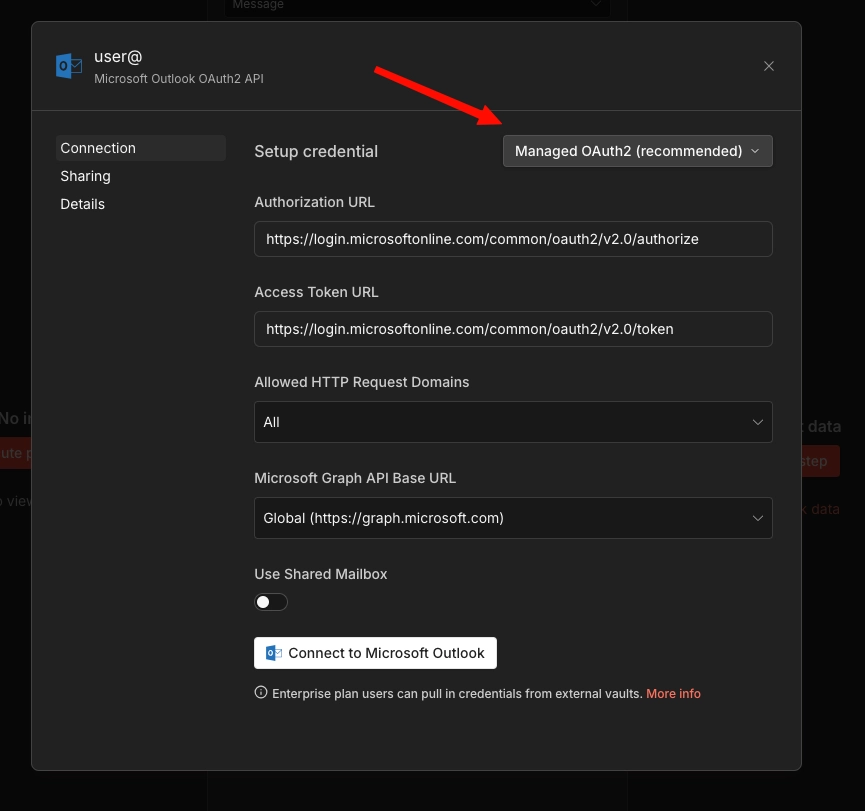
After n8n starts, have a user create a new credential for one of the pre-configured services (for example, Microsoft Outlook). They should see a Managed OAuth2 (recommended) option in the credential selection.
The user can click Connect to Microsoft Outlook, with no auth required. An Account connected message should appear
If the Managed OAuth 2 option doesn't appear, the environment variable wasn't applied correctly. Check that the file path in the volume mount matches the value of CREDENTIALS_OVERWRITE_DATA_FILE.
For Kubernetes deployments, replace the Docker volume mount with Kubernetes-native primitives. The approach differs by cloud provider. Choose the section that matches your environment.
spec:containers:-name:n8nimage:docker.n8n.io/n8nio/n8n:latestenv:-name:CREDENTIALS_OVERWRITE_DATA_FILEvalue:/run/secrets/credentials-overwrite.json# ...your other env varsvolumeMounts:-name:credentials-overwritemountPath:/run/secrets/credentials-overwrite.jsonsubPath:credentials-overwrite.jsonreadOnly:truevolumes:-name:credentials-overwritesecret:secretName:n8n-credentials-overwrite
The subPath field is important. Without it, Kubernetes replaces the entire /run/secrets/ directory rather than mounting just the single file.
Alternative: inline environment variable
To skip the volume mount entirely, reference the Secret directly as an environment variable:
This is cleaner for single-service setups, but note that some Kubernetes environments restrict environment variable size (for example, to 128KB per variable). The file-based approach is safer if you have many credential overwrites.
This approach uses the AWS Secrets Store CSI Driver to mount a secret from AWS Secrets Manager directly into the pod. It adds rotation support, CloudTrail audit logging, and centralised secret management.
Prerequisites:
Secrets Store CSI Driver and ASCP (AWS Secrets and Configuration Provider) installed on the cluster
IAM OIDC provider configured for the cluster (required for IRSA)
An IAM role with secretsmanager:GetSecretValue and secretsmanager:DescribeSecret permissions
1. Create the secret in AWS Secrets Manager:
1234
awssecretsmanagercreate-secret\--namen8n/credentials-overwrite\--description"n8n credential overwrites for Microsoft OAuth"\--secret-string'{"microsoftOutlookOAuth2Api":{"clientId":"YOUR_CLIENT_ID","clientSecret":"YOUR_CLIENT_SECRET"}}'
The CSI driver syncs the updated value on its polling interval (default two minutes). Restart the n8n pod for n8n to read the updated file, as n8n reads the credentials file at startup.
# Create a managed identity
azidentitycreate\--namen8n-workload-identity\--resource-groupyour-resource-group\--locationyour-region
# Get the identity client IDCLIENT_ID=$(azidentityshow\--namen8n-workload-identity\--resource-groupyour-resource-group\--queryclientId-otsv)# Grant the identity access to the Key Vault
azkeyvaultset-policy\--namen8n-credentials-vault\--secret-permissionsget\--spn"$CLIENT_ID"# Get the OIDC issuer URL for your clusterOIDC_ISSUER=$(azaksshow\--nameyour-cluster\--resource-groupyour-resource-group\--query"oidcIssuerProfile.issuerUrl"-otsv)# Create the federated credential
azidentitycredentialcreate\--namen8n-workload-identity\--resource-groupyour-resource-group\--issuer"$OIDC_ISSUER"\--subjectsystem:serviceaccount:your-namespace:n8n-sa\--audienceapi://AzureADTokenExchange
# Create a Google service account
gcloudiamservice-accountscreaten8n-secret-reader\--display-name="n8n Secret Reader"\--projectyour-project-id
# Grant it access to the secret
gcloudsecretsadd-iam-policy-bindingn8n-credentials-overwrite\--member="serviceAccount:[email protected]"\--role="roles/secretmanager.secretAccessor"\--projectyour-project-id
# Bind the Kubernetes service account to the Google service account
gcloudiamservice-accountsadd-iam-policy-binding\[email protected]\--role="roles/iam.workloadIdentityUser"\--member="serviceAccount:your-project-id.svc.id.goog[your-namespace/n8n-sa]"
Because the SecretProviderClass references versions/latest, the CSI driver picks up the new version on its next sync. Restart the n8n pod for n8n to read the updated file.