Expressions for data transformation#
You can use expression transformation functions anywhere expressions are supported in n8n.
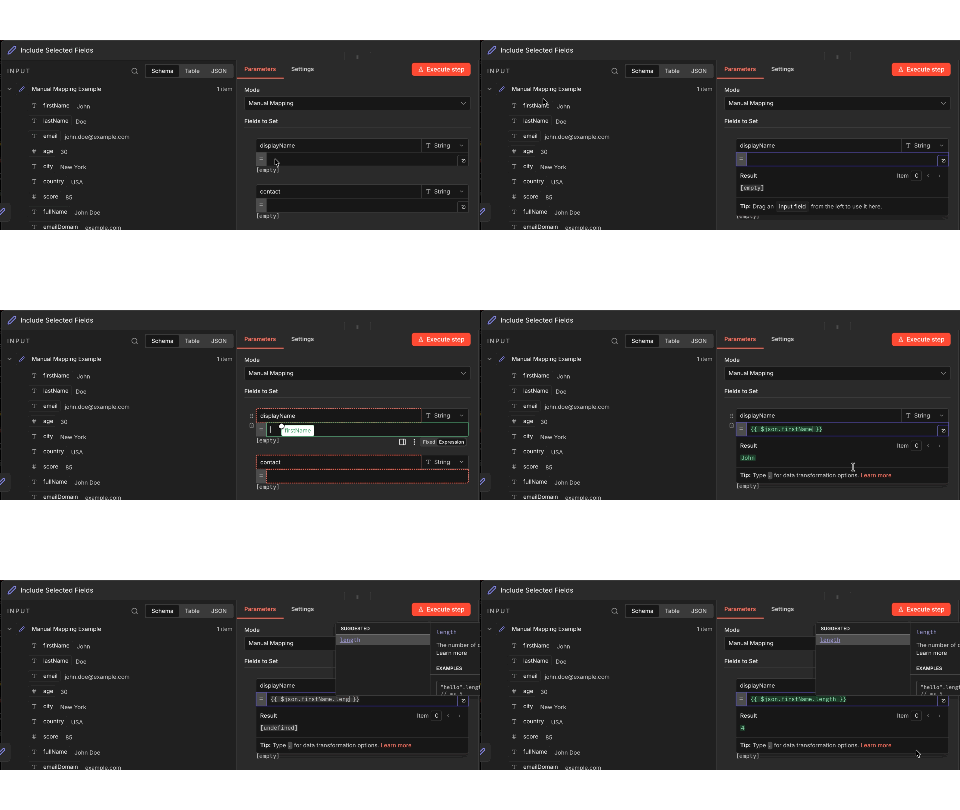
However, if your main goal is to transform data using expressions without performing any other operations, use the Edit Fields (Set) node. This node is designed specifically for data transformation, providing a clean interface to:
- Add new fields with expression-based values
- Modify existing field values using transformation functions
- Remove or rename fields
This keeps your workflow organized by separating data transformation from business logic, making it easier to understand and maintain.
Best practice: Instead of adding complex expressions to multiple parameters across different nodes, use Edit Fields to prepare your data first, then pass the transformed data to subsequent nodes.
See Expression reference for more information and examples.
Example: Get data from webhook body#
Consider the following scenario: you have a webhook trigger that receives data through the webhook body. You want to extract some of that data for use in the workflow.
Your webhook data looks similar to this:
1 2 3 4 5 6 7 8 9 10 11 12 13 14 15 | |
In the next node in the workflow, you want to get just the value of city. You can use the following expression:
1 | |
This expression:
- Accesses the incoming JSON-formatted data using n8n's custom
$jsonvariable. - Finds the value of
city(in this example, "New York"). Note that this example uses JMESPath syntax to query the JSON data. You can also write this expression as{{$json['body']['city']}}.
Using expressions in credentials#
You can also use expressions in credential fields. When you reference data using expressions (for example, {{$json.body.city}} or {{ $('Webhook').item.json.headers.authorization }}), n8n evaluates the expression within the context of the current workflow execution.
This means that:
- Expressions in credentials can access data available in the current execution context, including data from previous nodes.
- Each workflow execution has its own data context.
- Expressions are evaluated per execution, so different executions don't share data.
For example, if a webhook node receives an access token and you reference it in a credential field using an expression, the value is resolved using the execution data of that specific workflow run.
Example: Writing longer JavaScript as expressions#
You can do things like variable assignments or multiple statements in an expression, but you need to wrap your code using the syntax for an Immediately Invoked Function Expression (IIFE).
The following code use the Luxon date and time library to find the time between two dates in months. We surround the code in both the handlebar brackets for an expression and the IIFE syntax.
1 2 3 4 5 6 | |
Common issues#
Here are some common errors and issues related to expressions and steps to resolve or troubleshoot them.
The 'JSON Output' in item 0 contains invalid JSON#
This error occurs when you use JSON mode but don't provide a valid JSON object. Depending on the problem with the JSON object, the error sometimes displays as The 'JSON Output' in item 0 does not contain a valid JSON object.
To resolve this, make sure that the code you provide is valid JSON:
- Check the JSON with a JSON validator.
- Check that your JSON object doesn't reference undefined input data. This may occur if the incoming data doesn't always include the same fields.
Can't get data for expression#
This error occurs when n8n can't retrieve the data referenced by an expression. Often, this happens when the preceding node hasn't been run yet.
Another variation of this may appear as Referenced node is unexecuted. In that case, the full text of this error will tell you the exact node that isn't executing in this format:
An expression references the node '<node-name>', but it hasn't been executed yet. Either change the expression, or re-wire your workflow to make sure that node executes first.
To begin troubleshooting, test the workflow up to the named node.
For nodes that use JavaScript or other custom code, you can check if a previous node has executed before trying to use its value by checking the following:
1 | |
As an example, this JSON references the parameters of the input data. This error will display if you test this step without connecting it to another node:
1 2 3 | |
Invalid syntax#
This error occurs when you use an expression that has a syntax error.
For example, the expression in this JSON includes a trailing period, which results in an invalid syntax error:
1 2 3 4 | |
To resolve this error, check your expression syntax to make sure it follows the expected format.