> For the complete documentation index, see [llms.txt](https://docs.n8n.io/llms.txt). Markdown versions of documentation pages are available by appending `.md` to page URLs; this page is available as [Markdown](https://docs.n8n.io/choose-how-to-use-n8n.md).
# Choose how to use n8n
Choose between n8n Cloud and self-hosting, and learn about licenses and plans.
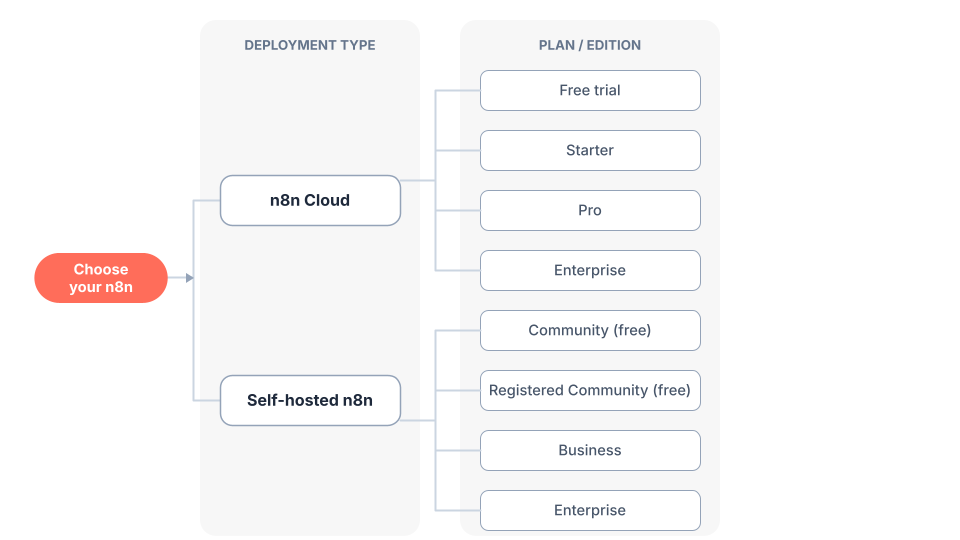
n8n offers two primary deployment options: **n8n Cloud** (fully-managed) and **Self-hosted** (deploy on your own infrastructure). Choosing involves two decisions:
1. **Cloud or self-hosted?** Decide whether n8n manages the infrastructure or you do.
2. **Which plan or edition?** Within each option, pick the tier that has the features and limits you need.
This page helps with both.
Choosing your n8n deployment option, plan, and edition
{% hint style="info" %}
**Want to try n8n quickly?**
**Start with n8n Cloud** for instant access with no installation required.
[Start free trial](https://n8n.io/cloud/)
{% endhint %}
## Decision 1: Cloud or self-hosted
Use this guide to choose a deployment option:
| Your situation | Recommended option | Reason |
| ------------------------------------------------------------ | ----------------------------------- | ----------------------------------------------------- |
| Want to start right away | **n8n Cloud** | No installation needed |
| Don't have technical expertise | **n8n Cloud** | Fully managed, no setup or maintenance required |
| Need production-ready deployment | **Both options work** | Both n8n Cloud and self-hosted support production use |
| Don't want to manage infrastructure | **n8n Cloud** | n8n handles hosting, updates, and scaling |
| Need full control over deployment | **Self-hosted** | You control the environment and configuration |
| Have customized use cases | **Self-hosted** | Full control over deployment and configuration |
| Need enterprise features (SSO, environments, projects, etc.) | **Both options work** | Enterprise plans (paid) are available with both |
| Have infrastructure and technical resources | **Self-hosted** | You can manage your own deployment |
| Want to run n8n for free | **Self-hosted (Community edition)** | Free with almost the complete feature set |
For specific feature availability across different plans, see the [pricing page](https://n8n.io/pricing/).
### Pros and cons comparison
| Aspect | n8n Cloud | Self-hosted |
| ----------------------------- | ------------------------------ | ------------------------------------------------ |
| **Setup & Deployment** | | |
| Installation | ✅ No installation needed | ❌ Requires setup (npm, Docker, or server) |
| Technical expertise | ✅ None required | ❌ Required for installation and configuration |
| **Infrastructure Management** | | |
| Hosting | ✅ Fully hosted by n8n | ❌ You must provide and manage infrastructure |
| Maintenance | ✅ Handled by n8n | ❌ Your responsibility |
| **Control & Customization** | | |
| Deployment control | ❌ Managed by n8n | ✅ Full control over deployment |
| Customization | ❌ Limited to available options | ✅ Recommended for customized use cases |
| **Cost** | | |
| Free option | ⚠️ Free trial available | ✅ Free Community edition with most features |
| Paid options | ✅ Range of paid plans | ✅ Paid Business and Enterprise options available |
| **Features** | | |
| Core features | ✅ Included | ✅ Included in free Community edition |
| Enterprise features | ❌ Requires paid plans | ❌ Requires a paid plan (free Community limited) |
| **Use Cases** | | |
| Quick start | ✅ Ideal for getting started | ⚠️ Takes longer to set up |
| Production use | ✅ Supported | ✅ Recommended for production |
| Custom requirements | ⚠️ Limited customization | ✅ Recommended for customized use cases |
**Legend**: ✅ Advantage | ❌ Disadvantage | ⚠️ Mixed/depends on needs
For specific feature availability across different plans, see the [pricing page](https://n8n.io/pricing/).
## Decision 2: Choose a plan or edition
Once you've chosen a deployment option, pick a plan or edition. The [pricing page](https://n8n.io/pricing/) lists the definitive features, usage limits, and prices.
### Pick a plan for n8n Cloud
Every plan runs on the same underlying product with different features, usage limits, and computing power.
| Plan | Designed for |
| -------------- | --------------------------------------------------------------------------------- |
| **Free trial** | Trying n8n Cloud with Pro features for 14 days |
| **Starter** | Individuals and small projects getting started |
| **Pro** | Power users and small teams that need higher limits, admin accounts, and insights |
| **Enterprise** | Organizations that need advanced security, scaling, and dedicated support |
For how to start a trial and upgrade, see [Try free then choose a plan](/deploy/use-n8n-cloud/start-your-free-trial.md). For what each plan includes, see the [pricing page](https://n8n.io/pricing/).
### Pick a plan or edition for self-hosted n8n
Every self-hosted installation runs on the same underlying product. You can stick with the free Community edition indefinitely, or register for free to unlock extra features. For paid features, subscribe to a plan to get a license key that unlocks them.
| Edition / Plan | Cost | Designed for |
| ------------------------ | -------------------------------------------------------- | ---------------------------------------------------------------------------------------------------- |
| **Community** | Free | Self-hosting with almost the complete feature set |
| **Registered Community** | Free | Community plus folders, debug in editor, and custom execution data. Unlock by registering your email |
| **Business** | Paid (license key when you subscribe to Business plan) | Teams needing paid features like SSO, environments, and projects |
| **Enterprise** | Paid (license key when you subscribe to Enterprise plan) | Organizations needing the most advanced security, scaling, and governance |
For the differences between editions and how to register or license an instance, see [Compare plans and editions](/deploy/host-n8n/community-edition-features.md). For what each plan includes, see the [pricing page](https://n8n.io/pricing/).
To register a Community edition instance for the extra free features, go to **Settings > Usage and plan** and select **Unlock**.
## Which features need a paid plan or edition
Some features require certain paid plan subscriptions, including:
* Custom variables
* Environments
* External secrets
* External storage for binary data
* Log streaming (standard logging is included)
* Multi-main mode (queue mode is included)
* Projects
* SSO (SAML, LDAP)
* Workflow and credential sharing
* Version control using Git
Feature availability changes over time and differs by plan and edition. For exactly what each plan and edition includes, the [pricing page](https://n8n.io/pricing/) is the definitive source. See also [Compare plans and editions](/deploy/host-n8n/community-edition-features.md) for how the self-hosted plans and editions differ.
## Getting started
Ready to begin?
* [**Get started with n8n Cloud**](https://n8n.io/cloud/) — sign up for instant access, then [choose a plan](/deploy/use-n8n-cloud/start-your-free-trial.md)
* [**Get started with self-hosted**](/deploy/host-n8n.md) — installation and deployment guides, then [choose a plan or edition](/deploy/host-n8n/community-edition-features.md)
For the current plans, editions, licenses, and prices, always check the [pricing page](https://n8n.io/pricing/).
## Related resources
* [n8n Docs](/welcome.md)
* [Build your first workflow](/build-your-first-workflow.md)
* [Learning paths](/learning-paths.md)
* [Key concept glossary](/key-concept-glossary.md)