> For the complete documentation index, see [llms.txt](https://docs.n8n.io/llms.txt). Markdown versions of documentation pages are available by appending `.md` to page URLs; this page is available as [Markdown](https://docs.n8n.io/changelog/changelog.md).

# Changelog

Every n8n release moves the platform forward. The changelog is where we call out the changes that matter most to the technical teams who build on n8n: new capabilities, more control over how your workflows run, and clearer visibility into what they're actually doing. Each entry is tied to the version it shipped in, newest first, and written to stand on its own, so it's easy to share the one update your team has been waiting for.

{% hint style="info" %}
For complete, version-by-version detail on every release, see the [Releases page](https://github.com/n8n-io/n8n/releases) on GitHub. This changelog covers stable n8n 2.x releases onward; release notes for [1.x](/changelog/release-notes-1.x.md) and [0.x](/changelog/release-notes-0.x.md) remain archived.
{% endhint %}

{% hint style="info" %}
**Stable and Beta versions**

n8n releases a new minor version most weeks. The `stable` version is for production use. `beta` is the most recent release. The `beta` version may be unstable. To report issues, use the [forum](https://community.n8n.io/c/questions/12).

Current `stable`: 2.25.7 Current `beta`: 2.26.4
{% endhint %}

### n8n 2.22 — Connect to MCP servers with less setup

**Released:** 2026-05-19

Connect your agent to select MCP servers without setting up an [MCP Client node](https://docs.n8n.io/integrations/builtin/core-nodes/n8n-nodes-langchain.mcpClient/) and credential by hand. Pick a server from the nodes panel, sign in, and it's available to your agent.

Initial coverage includes some of the most-used services in the official MCP registry — Apify, Linear, monday.com, Notion, and PostHog — and we'll expand the list to cover more services soon.

If you need to connect to an MCP server that isn't in the list, you can still use the [MCP Client node](https://docs.n8n.io/integrations/builtin/core-nodes/n8n-nodes-langchain.mcpClient/) with manual configuration.

{% embed url="<https://youtu.be/RGhHFbLMXhQ>" %}
Connect to MCP servers with less setup
{% endembed %}

### n8n 2.20 — Microsoft Agent 365 Trigger node

**Released:** 2026-05-05

#### Microsoft Agent 365 Trigger node

The [Microsoft Agent 365 Trigger node](https://docs.n8n.io/integrations/builtin/cluster-nodes/root-nodes/n8n-nodes-langchain.microsoftagent365trigger/) lets you build n8n agents that show up as members of your team inside Microsoft 365 apps. Once deployed, your agent gets its own identity in your Microsoft tenant, with an email address you can @mention in Teams, send email to, or grant SharePoint permissions to — just like a teammate.

<figure><img src="/files/53CEcPwHqGSGiW1v5M0U" alt="A Microsoft Agent 365 Trigger node with a chat model, memory, and tools across Zendesk, Salesforce, PagerDuty, Datadog, and a sub-workflow."><figcaption><p>A Microsoft Agent 365 Trigger node with a chat model, memory, and tools across<br>Zendesk, Salesforce, PagerDuty, Datadog, and a sub-workflow.</p></figcaption></figure>

You build the agent in n8n using the trigger node: add a system prompt and give it access to tools, MCP servers, and your existing workflows using [sub-workflows as tools](https://docs.n8n.io/flow-logic/subworkflows/). You then set the agent up on the Microsoft side, which gives it an Entra ID identity with an email address. Microsoft handles identity, lifecycle, security, and compliance (via Entra ID, Purview, and Defender); n8n handles workflow-level governance like RBAC, credential management, and execution logs.

If you already use n8n with Microsoft services through individual nodes (Outlook, Teams, SharePoint, and so on), those workflows continue to work as before. Agent 365 is a new path for teams that want their agents to show up *inside* Microsoft apps and interact like a member of the team. The node requires a Microsoft 365 tenant.

For the full launch story, see the [n8n blog post](https://blog.n8n.io/deploy-n8n-agents-that-show-up-as-members-of-the-team-inside-microsoft-apps/).

#### Insights data duration

Self-hosted instances can now retain insights data for up to 365 days by default, with a configurable maximum of 730 days. Retention is controlled by the new `N8N_INSIGHTS_MAX_AGE_DAYS` environment variable and is no longer tied to license logic. See the [insights docs](https://docs.n8n.io/insights/).

### n8n 2.19 — IdP role mapping and instance bootstrapping (Enterprise)

**Released:** 2026-04-28

#### IdP role mapping inside n8n

Instance admins can now define group-to-role mappings inside n8n instead of encoding n8n-specific role logic in the IdP. With JIT provisioning enabled, admins write expressions against SAML attributes or OIDC claims to assign instance and project roles automatically at login. The IdP only needs to send standard group membership data: n8n handles the mapping, and role assignments are re-evaluated on every login, so access stays in sync without IdP changes.

Open **Settings → SSO**, pick **Instance roles via SSO** or **Instance and project roles via SSO** under User role provisioning, switch the mapping card from "Map rules on your IdP" to "Map rules inside n8n", and add expressions using the `$claims` object to match users for each role. Expression-based matching handles non-standard group structures that plain string matching can't reach.

{% hint style="info" %}
**Availability:** Enterprise and Business.
{% endhint %}

#### Instance bootstrapping

n8n can now be fully configured at startup through environment variables. Owner accounts, SSO (OIDC and SAML), security policies, and log streaming destinations are all applied on first boot, with no manual UI interaction required. Fields managed this way are locked in the UI and re-applied on every restart.

This makes deployment configuration the single source of truth, so you can stand up a fully configured instance from a single Helm chart or Docker Compose file, including SSO and security policy, before any user logs in.

{% hint style="info" %}
**Availability:** Enterprise.
{% endhint %}

### n8n 2.16 — Embedded access and execution data redaction (Enterprise)

**Released:** 2026-04-07

#### Token exchange authentication for embedded access

n8n now supports OAuth 2.0 Token Exchange (RFC 8693) as a second authentication mechanism alongside API keys. Two scenarios are covered: seamless iframe embedding, where users see n8n inside another product without a separate login screen, and delegated API access, where a system acts on behalf of a user with full audit attribution.

The embedding system holds an asymmetric private key and signs short-lived JWTs with user identity claims. n8n verifies the signature using the configured public key, just-in-time provisions the user on first encounter, and issues a session cookie or scoped API token depending on the flow. Both subject and actor are preserved in the audit trail, so every action shows both who requested it and who performed it.

{% hint style="info" %}
**Availability:** Enterprise. Requires an asymmetric key pair configured via `N8N_TOKEN_EXCHANGE_TRUSTED_KEYS`. Uses role-based scoping.
{% endhint %}

#### Execution data redaction

Instance and project admins can now redact execution data. When enabled, sensitive data from production runs is never displayed in the UI, and isn't fetched from the database until a user with the reveal permission explicitly requests it. Manual executions can be left fully visible so developers can keep building and debugging without interruption. Every reveal is logged as an audit event.

Redaction is configured per workflow under **Workflow settings**, and reveal access is granted via project or instance settings to specific users only. See the [execution data redaction docs](https://docs.n8n.io/workflows/executions/execution-data-redaction/).

{% hint style="info" %}
**Availability:** Enterprise.
{% endhint %}

#### Public API improvements

* **Community packages.** Install, list, update, and uninstall community packages programmatically through new endpoints under `/api/v1/community-packages`. Each operation requires an API key with the matching `communityPackage:*` scope.
* **Insights scope.** A new `insights:read` API key scope, setting up the insights summary endpoint that ships in v2.17.

### n8n 2.15 — OpenTelemetry support for workflows

**Released:** 2026-03-30

n8n now emits OpenTelemetry traces for workflow executions. Runs become traces in your existing OpenTelemetry backend, with no sidecars, custom exporters, or timing hacks. Teams already using Jaeger, Datadog, Grafana Tempo, Honeycomb, New Relic, or Splunk see n8n alongside everything else they observe.

Each execution appears as a root trace span with workflow ID, name, execution ID, status, duration, node count, and project info as span attributes. Failed runs surface error details on the span, so you can search and alert on workflow failures from the same tools that watch the rest of your stack.

Enable by pointing n8n at any OTLP-compatible collector. Minimum config is two environment variables:

```
N8N_OTEL_ENABLED=true
N8N_OTEL_EXPORTER_OTLP_ENDPOINT=http://your-collector:4318
```

Standard OTel variables (`OTEL_EXPORTER_OTLP_ENDPOINT`, `OTEL_SERVICE_NAME`) are also respected.

This is the foundational T1 feature. It was extended across later releases: node-level spans (v2.16), workflow version IDs in spans and distributed trace context propagation (v2.18 to v2.19), and AI Agent telemetry (v2.20).

{% hint style="info" %}
**Availability:** Free, Pro, and Enterprise.
{% endhint %}

### n8n 2.13 — Visual diff in version history

**Released:** 2026-03-16

#### Visual diff comes to version history

Open version history, click **Compare changes**, pick any two versions, and the canvas renders both side by side with changed nodes highlighted. A change count badge on each version helps you spot significant edits at a glance.

Visual diff is available on Cloud Pro and above.

#### Project-scoped external secrets: full team access (Enterprise)

What's new:

* Project admins manage their own vault connections from project settings.
* Project editors can use project-scoped secrets in credentials once the instance admin enables access.
* [Custom roles](https://docs.n8n.io/user-management/rbac/custom-roles/) now include five secrets scopes: list, read, create, update, and delete.
* Instance admins/owners no longer need to be project members for secrets to resolve.

**For instance admins:** go to **Settings > External Secrets** and enable the **System Roles** toggle, or use custom roles for more granular control.

**For project admins:** go to **Project Settings > External Secrets** to create and manage project-level connections. Instance-level connections shared with you appear as read-only.

Refer to [External secrets](https://docs.n8n.io/external-secrets/) for more information.

{% hint style="info" %}
**Availability:** Enterprise.
{% endhint %}

#### Folder-based filtering in the push and pull dialog (Enterprise)

The push and pull dialogs now include a **Folder** filter alongside Status and Owner. Selecting a folder scopes the list to workflows in that folder and its subfolders, shown as a hierarchical tree with folder-level checkboxes. Text search also matches folder names.

{% hint style="info" %}
**Availability:** Enterprise. Requires [Environments](https://docs.n8n.io/source-control-environments/setup/) configured.
{% endhint %}

### n8n 2.12 — 1Password as an external secrets provider (Enterprise)

**Released:** 2026-03-09

n8n now supports 1Password Connect Server as an [external secrets](https://docs.n8n.io/external-secrets/) provider, alongside HashiCorp Vault, AWS Secrets Manager, Azure Key Vault, and GCP Secret Manager.

Secrets are fetched at runtime and never stored in n8n: 1Password stays the single source of truth. Multi-field items are available as structured sub-paths: `$secrets.<vault>.<item>.<field>`.

**How to connect:**

1. Deploy a 1Password Connect Server and create an access token scoped to the vaults n8n should read.
2. In n8n, go to **Settings > External Secrets**, select **1Password**, and enter your Connect Server URL and token.

Requires a self-hosted 1Password Connect Server with read-only access.

{% hint style="info" %}
**Availability:** Enterprise.
{% endhint %}

### n8n 2.11 — Easier credential setup on Cloud

**Released:** 2026-03-02

#### Easier credential setup on Cloud

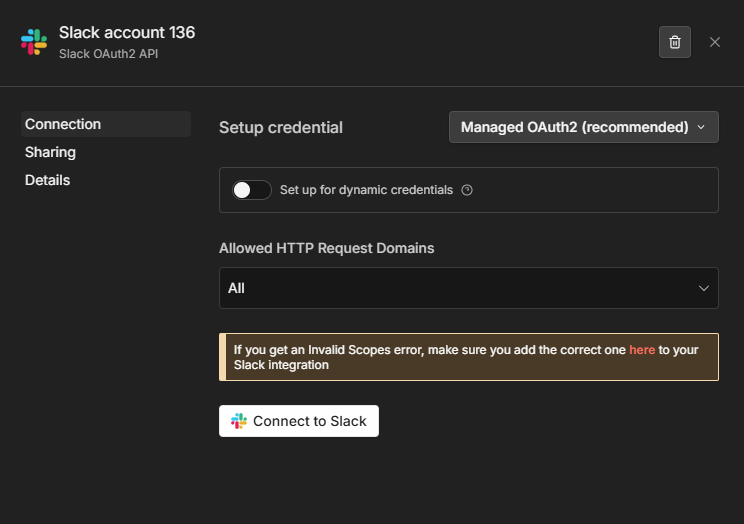
Setting up credentials on n8n Cloud is now much simpler. For supported services, just click the **Connect** button, authenticate with the service, and you're ready to go. Skip the manual setup for Slack, Firecrawl, HubSpot, GitHub, Google Calendar, PagerDuty, Apify, and more.

<figure><img src="/files/ugW9hCA904B8kCwW71Zr" alt="Setting up Slack credentials with managed OAuth"><figcaption><p>Setting up Slack credentials with managed OAuth</p></figcaption></figure>

Things to keep in mind:

* If you prefer to use your own OAuth configuration, you can still switch to manual setup from the auth mode dropdown at any time.
* This feature is only available on n8n Cloud, where n8n manages the OAuth apps on your behalf.

#### Custom roles: Assignments tab (Enterprise)

Instance admins now have a dedicated **Assignments** tab on each [custom role](https://docs.n8n.io/user-management/rbac/custom-roles/) showing every user assigned to that role, which project they're in, and a direct link to manage them — no more navigating project by project.

#### Project-scoped external secrets: instance admin setup (Enterprise)

Instance admins can now create vault connections scoped to a specific project. Secrets from that connection appear only within that project's credentials, not across the instance. Instance-level connections are unaffected. Refer to [External secrets](https://docs.n8n.io/external-secrets/) for more information.

#### Workflow execute as a separate permission scope (Enterprise)

`workflow:execute` is now a distinct scope in [custom project roles](https://docs.n8n.io/user-management/rbac/custom-roles/), separate from editing and publishing. Users can be granted run access without being able to modify the workflow, which is a common compliance requirement for sensitive workflows.

{% hint style="info" %}
**Availability:** Custom roles and project-scoped external secrets are available on n8n Enterprise.
{% endhint %}

### n8n 2.8 — Personal space policies and finer-grained governance (Enterprise)

**Released:** 2026-02-09 – 2026-02-13 (2.8.0–2.8.3)

#### Personal space policies

*Released in 2.8.3 (2026-02-13).*

A new **Security & policies** settings section provides a central place for enforcing security requirements on your instance. In addition to the existing two-factor authentication enforcement, admins can now control what users can do in their personal spaces.

Available policies include:

* **Sharing**: control whether users can share workflows and credentials from their personal space.
* **Workflow publishing**: control whether users can publish workflows from their personal space.

This release builds on recent updates to the permissions model, including [custom project roles](https://docs.n8n.io/user-management/rbac/custom-roles/), to better support policy-driven governance.

<figure><img src="/files/fLqpEOiZWgJLGeDOV344" alt="The new Security &#x26; policies settings section"><figcaption><p>The new Security &#x26; policies settings section</p></figcaption></figure>

#### Custom roles: improved discoverability and permission visibility

*Released in 2.8.3 (2026-02-13).*

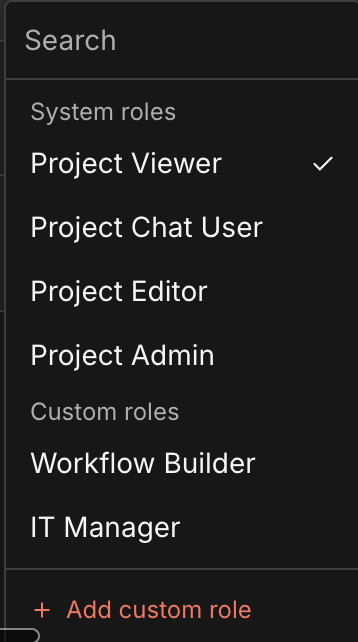
The project role selector now separates built-in system roles and custom roles into distinct sections, making it easier to find and choose the right role. Hovering over a role shows a summary of its configured permissions, with an option to view the full permission details.

<figure><img src="/files/FEQFzWTmLoX1poadPj6E" alt="System roles and custom roles are now displayed in separate sections"><figcaption><p>System roles and custom roles are now displayed in separate sections</p></figcaption></figure>

#### Stronger external secrets validation

*Released in 2.8.0 (2026-02-09).*

n8n now verifies that the current user has access to the referenced vaults before allowing a credential that uses `$secrets...` expressions to be saved. If access is missing, the save operation fails. This prevents secret values from being exposed through guessed secret paths.

#### Improved API auditability

*Released in 2.8.0 (2026-02-09).*

API endpoints have been expanded to provide clearer visibility into project membership and credentials:

* `GET /projects/{projectId}/users` returns all members of a project including their assigned role.
* `GET /credentials` returns a paginated list of all credentials across the instance, including the project they belong to.

This makes it easier to audit who has access to which projects and credentials without manually reviewing each one in the UI.

#### More granular workflow permissions

*Released in 2.8.0 (2026-02-09).*

Workflow publishing permissions for [custom roles](https://docs.n8n.io/user-management/rbac/custom-roles/) have been split into two separate scopes: `workflow:publish` and `workflow:unpublish`. This enables more precise access control in governance scenarios where unpublishing needs to be managed independently.

{% hint style="info" %}
**Availability:** Personal space policies, custom roles, stronger external secrets validation, and improved API auditability are available on n8n Enterprise.
{% endhint %}

### n8n 2.6 — Human-in-the-loop for AI tool calls

**Released:** 2026-01-26

You can now require explicit human approval before an AI Agent executes specific tools.

Human-in-the-loop (HITL) for AI tool calls enforces review directly at the tool level. A gated tool cannot execute unless a human explicitly approves the action, giving you deterministic control over high-impact operations like deleting records, writing to production systems, or sending high-impact emails. This removes the uncertainty of prompt-based safeguards and insulates you from probabilistic agent behavior.

Because the review step is implemented using standard n8n integrations, approvals are not limited to a single user or interface. Decisions can be routed across people and systems, enforcing approval from the right person using the channels they already work in.

**What you can do:**

* Require explicit human approval for any tool the agent can call, including the MCP Client tool or sub-workflows exposed as tools.
* Apply approval selectively, so some tools execute autonomously while others require review.
* Route approvals across users and channels (for example, send a Slack-initiated action for approval by another user via email).
* Add safety checks for high-impact or potentially destructive operations without complex workflow patterns or brittle prompt logic.

**How to use it:** on the connection from the AI Agent to the tool you want to gate, click the **+** icon and choose **Add human review step**. The Tools panel opens with nodes you can use to handle the review; select one and configure the approver, the message, and the available actions.

Get precise control over where human judgment is required, without limiting what your agent can do. Learn more in the [human-in-the-loop tools docs](https://docs.n8n.io/advanced-ai/human-in-the-loop-tools/).

{% embed url="<https://youtu.be/B-_nIFI27VY>" %}
Human in the loop for AI tool calls
{% endembed %}

### n8n 2.5 — Chat node: human-in-the-loop actions

**Released:** 2026-01-20

The **Chat** node now includes two new actions for human-in-the-loop interactions in agentic workflows:

* **Send a message**: send a message to the user and continue the workflow.
* **Send a message and wait for response**: send a message and pause execution until the user replies. Users can respond with free text in the Chat or by clicking inline approval buttons, as defined in the node's configuration.

These actions can be used as deterministic workflow steps or as tools for an **AI Agent**, enabling multi-turn human interaction within a single execution when using the **Chat Trigger**.

When used as an agent tool, the agent can ask for clarification before proceeding, helping it better interpret user intent and follow instructions. Agents can also send updates during long-running workflows using these actions.

**How to:**

1. Trigger your workflow with the **Chat Trigger** node. In the node parameters, add the *Response Mode* option and set it to *Using Response Nodes*.
2. Add a **Chat** node later in the workflow, or add it as a tool for an **AI Agent**. Select one of the operations: *Send a message* or *Send a message and wait for response*.

Keep in mind: if you want an AI Agent to choose between sending a message or waiting for input, add two **Chat** tool nodes, one for each action. For AI Agents triggered by the **Chat Trigger** node, adding **Send a message and wait for response** is recommended so the agent can request clarification when needed.

Learn more in the [Chat node documentation](https://docs.n8n.io/integrations/builtin/core-nodes/n8n-nodes-langchain.chat/#operation).

{% embed url="<https://youtu.be/CpFqawY0RCc>" %}
Human in the loop for the Chat node
{% endembed %}

### n8n 2.4 — TLS for Syslog log streaming and credential updates via API

**Released:** 2026-01-12

#### TLS support for Syslog log streaming

The Syslog log streaming destination now supports TLS over TCP for encrypted connections. This enables secure log streaming to enterprise SIEM and observability platforms that require encrypted transport. With this release, log streaming is now compatible with a broader range of enterprise SIEM platforms.

#### Update credentials via API

n8n's public API now supports updating existing credentials by ID via a new `PATCH /credentials/:id` endpoint. Previously, credentials could only be created through the API, so any changes required deleting and recreating the credential.

When updating, you can either replace all credential data at once (useful for bulk updates) or set `isPartialData: true` to merge changes with existing data. Ideal for automated secret rotation or fixing individual values without losing your configuration.

### n8n 2.2 — Finer-grained workflow permissions and richer audit events

**Released:** 2025-12-22

#### More granular workflow permissions within Custom Project Roles (Enterprise)

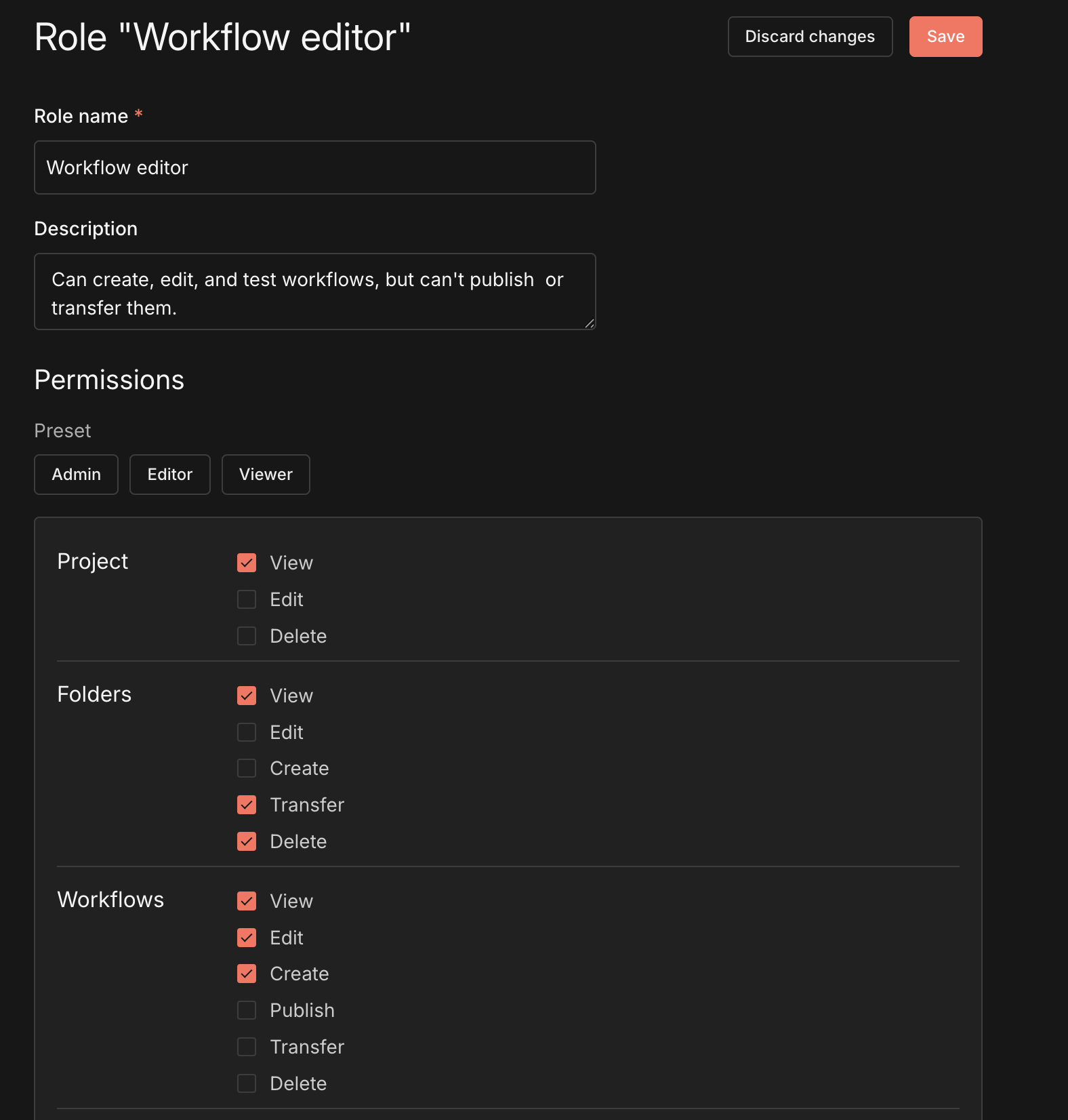
Custom Project Roles allow you to define fine-grained permissions at the project level. With this release, workflow permissions have been further refined by separating workflow editing from workflow publishing.

This change makes it easier to align access controls with internal processes where building workflows and publishing them are handled by different users or teams.

<figure><img src="/files/F62QYVbGlCP7712tr1wd" alt="Custom Project Roles"><figcaption><p>Custom Project Roles</p></figcaption></figure>

#### Log streaming: more audit events for improved observability

Log streaming now includes additional audit events to improve visibility into operational and security-relevant changes.

This update adds events for manual workflow cancellations and workflow activation/deactivation (publish/unpublish), variable lifecycle events (create/update/delete), and user management actions (including enabling/disabling 2FA).

Workflow settings updates are also logged with the specific parameters that changed (for example, selecting a new error workflow), instead of a generic "updated" event.

### n8n 2.1 — Time Saved node

**Released:** 2025-12-16

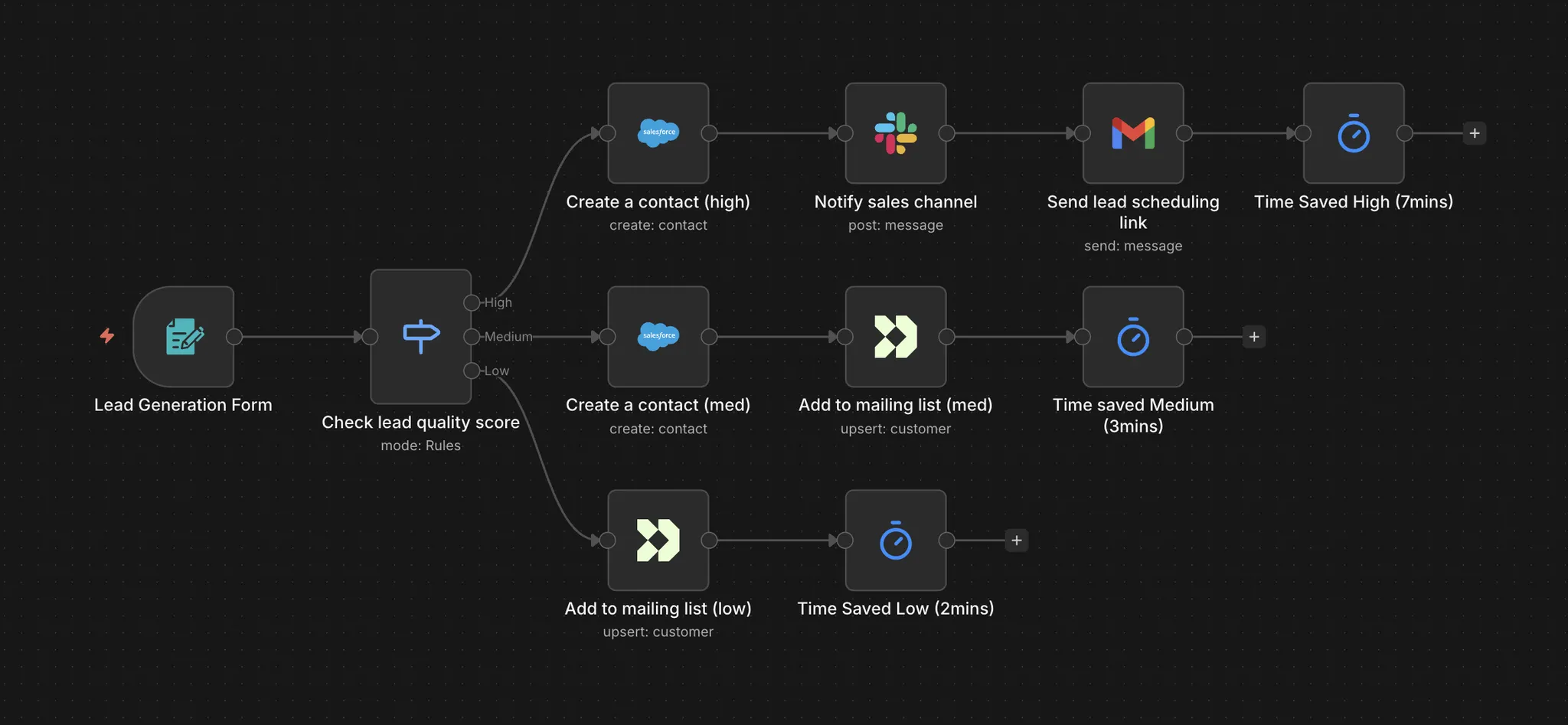
Previously, teams could only track a single fixed time saved value for each workflow regardless of which path an execution takes. The new Time Saved node enables more precise time savings calculations where different execution paths save different amounts of time.

With this release you can now:

* **Choose fixed value or dynamic time tracking**: use a fixed time saved value for simple workflows, or use one or many Time Saved nodes to calculate savings dynamically based on the actual execution path taken.
* **Configure per-item calculations**: when using the Time Saved node, choose whether to calculate time saved once for all items or multiply by the number of items processed.

<figure><img src="/files/Sc4YUhWlXQME6aIIsDz6" alt="Time saved node in a workflow"><figcaption><p>Time saved node in a workflow</p></figcaption></figure>

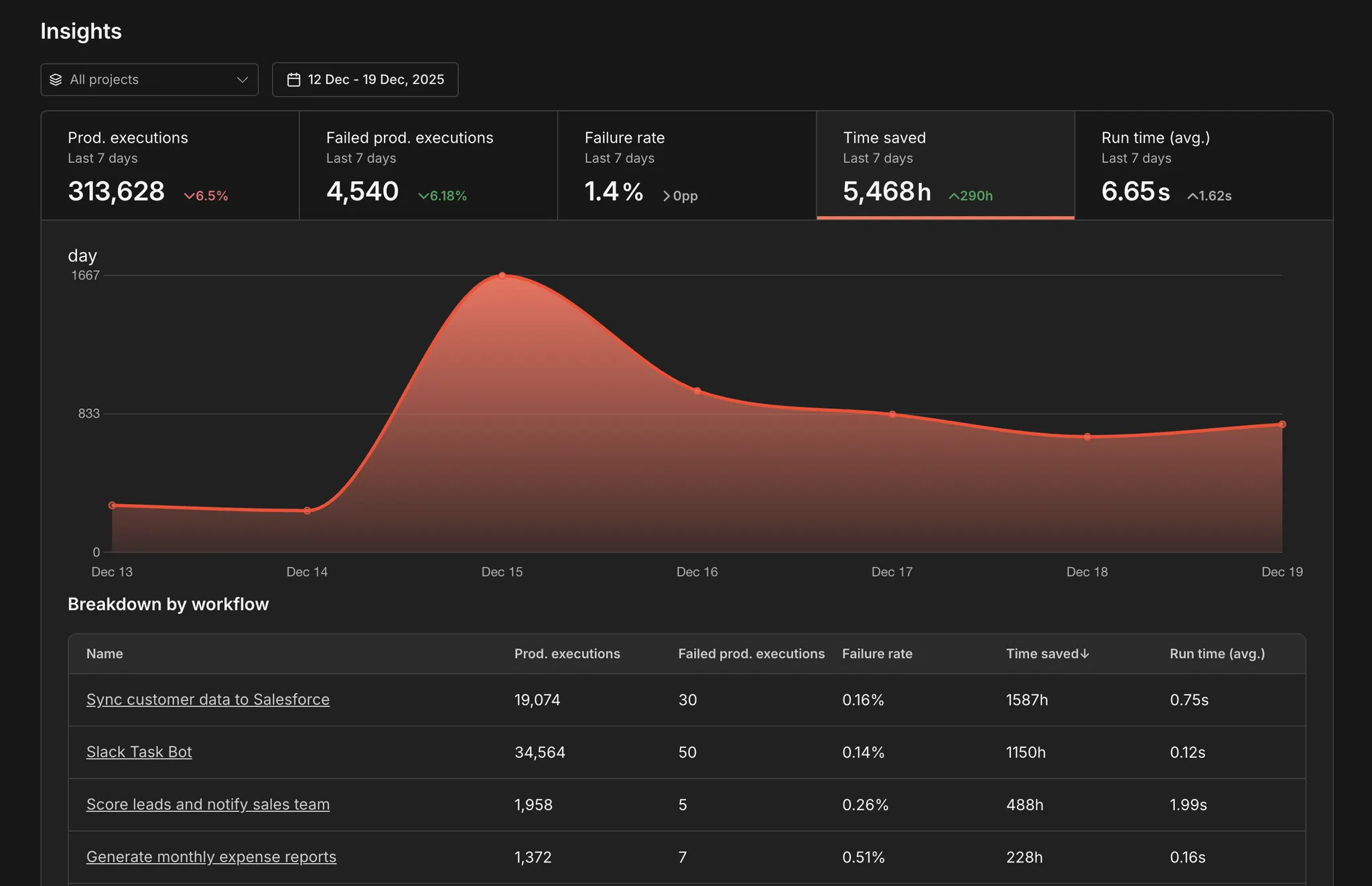
n8n automatically totals the time from all Time Saved nodes executed during each workflow run and reports it within the insights dashboard.

<figure><img src="/files/zshHWC6DAoWwWP7hLsft" alt=""><figcaption><p>Total time saved calculation</p></figcaption></figure>


---

# Agent Instructions
This documentation is published with GitBook. GitBook is the documentation platform designed so that both humans and AI agents can read, navigate, and reason over technical content effectively. Learn more at gitbook.com.

## Querying This Documentation
If you need additional information that is not directly available in this page, you can query the documentation dynamically by asking a question.

Perform an HTTP GET request on the current page URL with the `ask` query parameter, and the optional `goal` query parameter:

```
GET https://docs.n8n.io/changelog/changelog.md?ask=<question>&goal=<endgoal>
```

`ask` is the immediate question: it should be specific, self-contained, and written in natural language.
`goal` is optional and describes the broader end goal you are ultimately trying to accomplish on behalf of the user. GitBook uses it to tailor the answer towards what is most useful for that goal.

The response will contain a direct answer to the question and relevant excerpts and sources from the documentation.

Use this mechanism when the answer is not explicitly present in the current page, you need clarification or additional context, or you want to retrieve related documentation sections.