> For the complete documentation index, see [llms.txt](https://docs.n8n.io/llms.txt). Markdown versions of documentation pages are available by appending `.md` to page URLs; this page is available as [Markdown](https://docs.n8n.io/build/work-with-data/reference-data/link-data-items/item-linking-errors.md).

# Item linking errors

In n8n you can reference data from any previous node. This doesn't have to be the node just before: it can be any previous node in the chain. When referencing nodes further back, you use the expression syntax `$(node_name).item`.

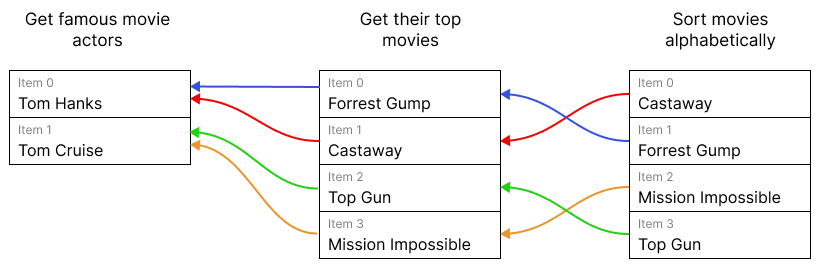
<figure><img src="/files/xH7Lllo09KJNNsJRMAQQ" alt=""><figcaption><p>Diagram of threads for different items. Due to the item linking, you can get the actor for each movie using `$('Get famous movie actors').item`.</p></figcaption></figure>

Since the previous node can have multiple items in it, n8n needs to know which one to use. When using `.item`, n8n figures this out for you behind the scenes. Refer to [Item linking concepts](/build/work-with-data/reference-data/link-data-items/how-items-link-through-workflows.md) for detailed information on how this works.

`.item` fails if information is missing. To figure out which item to use, n8n maintains a thread back through the workflow's nodes for each item. For a given item, this thread tells n8n which items in previous nodes generated it. To find the matching item in a given previous node, n8n follows this thread back until it reaches the node in question.

When using `.item`, n8n displays an error when:

* The thread is broken
* The thread points to more than one item in the previous node (as it's unclear which one to use)

To solve these errors, you can either avoid using `.item`, or fix the root cause.

You can avoid `.item` by using `.first()`, `.last()` or `.all()[index]` instead. They require you to know the position of the item that you're targeting within the target node's output items. Refer to [Referencing previous nodes](/build/work-with-data/reference-data/reference-previous-nodes.md) for more detail on these methods.

The fix for the root cause depends on the exact error.

### Fix for 'Info for expressions missing from previous node' <a href="#fix-for-info-for-expressions-missing-from-previous-node" id="fix-for-info-for-expressions-missing-from-previous-node"></a>

If you see this error message:

> ERROR: Info for expression missing from previous node

There's a node in the chain that doesn't return pairing information. The solution here depends on the type of the previous node:

* Code nodes: make sure you return which input items the node used to produce each output item. Refer to [Preserving linking in the Code node](/build/work-with-data/reference-data/link-data-items/preserving-linking-in-the-code-node.md) for more information.
* Custom or community nodes: the node creator needs to update the node to return which input items it uses to produce each output item. Refer to [Item linking for node creators](/build/work-with-data/reference-data/link-data-items/item-linking-for-node-creators.md) for more information.

### Fix for 'Multiple matching items for expression' <a href="#fix-for-multiple-matching-items-for-expression" id="fix-for-multiple-matching-items-for-expression"></a>

This is the error message:

> ERROR: Multiple matching items for expression

Sometimes n8n uses multiple items to create a single item. Examples include the Summarize, Aggregate, and Merge nodes. These nodes can combine information from multiple items.

When you use `.item` and there are multiple possible matches, n8n doesn't know which one to use. To solve this you can either:

* Use `.first()`, `.last()` or `.all()[index]` instead. Refer to [Referencing previous nodes](/build/work-with-data/reference-data/reference-previous-nodes.md) for more detail on these methods.
* Reference a different node that contains the same information, but doesn't have multiple matching items.


---

# Agent Instructions
This documentation is published with GitBook. GitBook is the documentation platform designed so that both humans and AI agents can read, navigate, and reason over technical content effectively. Learn more at gitbook.com.

## Querying This Documentation
If you need additional information that is not directly available in this page, you can query the documentation dynamically by asking a question.

Perform an HTTP GET request on the current page URL with the `ask` query parameter, and the optional `goal` query parameter:

```
GET https://docs.n8n.io/build/work-with-data/reference-data/link-data-items/item-linking-errors.md?ask=<question>&goal=<endgoal>
```

`ask` is the immediate question: it should be specific, self-contained, and written in natural language.
`goal` is optional and describes the broader end goal you are ultimately trying to accomplish on behalf of the user. GitBook uses it to tailor the answer towards what is most useful for that goal.

The response will contain a direct answer to the question and relevant excerpts and sources from the documentation.

Use this mechanism when the answer is not explicitly present in the current page, you need clarification or additional context, or you want to retrieve related documentation sections.
